Website analytics for startups: what to track (and what to ignore)
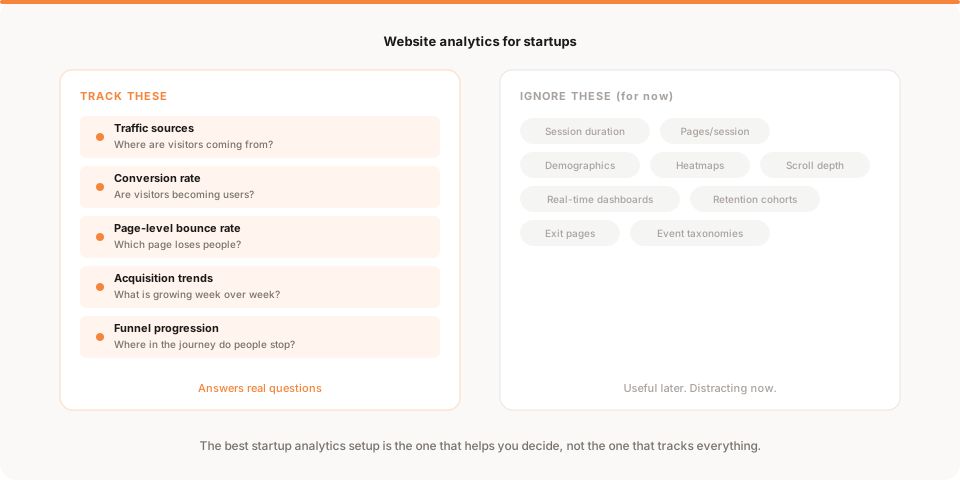
Startups should track traffic sources, conversion rate, page-level bounce rate, acquisition trends, and funnel progression. Everything else can wait.
You set up analytics. You installed a script. You opened the dashboard.
And now you are looking at a screen with 40 different metrics, three chart types, a date picker, a filter bar, and a sidebar that goes on forever.
You have no idea what matters.
This is the starting point for most startup founders. The tool works. The data flows. But the sheer volume of information makes it impossible to figure out what to pay attention to. So you close the tab, go back to building, and check again next month. Maybe.
The problem is not that you lack data. The problem is that nobody told you what data actually matters at your stage.
Why most startup analytics goes wrong
The analytics industry was built for enterprises. Google Analytics, Mixpanel, and Amplitude are powerful tools designed for teams with dedicated analysts, tracking plans, and monthly reporting cadences.
When a two-person startup installs one of these tools, they inherit a system that was designed for a 50-person team. The result is predictable: too many charts, zero answers.
The common mistakes look like this:
Tracking everything from day one
You set up event tracking for every button, every page, every scroll interaction. You build a tracking plan with 60 events. You feel productive.
Then you realize you have never looked at 55 of those events. The 5 that matter are buried under the noise.
Copying what bigger companies track
You read a blog post about how Stripe tracks Net Revenue Retention or how Slack measures DAU/MAU ratios. You try to apply those frameworks to your 30-user product. The numbers are meaningless at your scale.
Checking dashboards without a question
You open your analytics once a week and scan the charts. Nothing jumps out. You leave. You did not learn anything because you did not come in with a question.
This is the most expensive habit in startup analytics. It feels like work. It produces nothing.
What actually matters for an early-stage startup
At the earliest stage, your website is doing one job: turning strangers into interested users. Your analytics should help you understand whether that is happening and where it breaks.
Here are the five things worth tracking.
1. Traffic sources
Not total traffic. Traffic by source.
You need to know whether visitors are coming from organic search, social media, direct visits, or referrals. Each source has a different intent level and a different conversion pattern.
1,000 visitors from a Hacker News post and 1,000 visitors from Google search represent completely different growth signals. The first is a spike. The second is a foundation.
2. Conversion rate
This is the number that tells you whether your website is doing its job.
Conversion rate = signups / visitors. For most early startups, "conversion" means getting someone to create an account, join a waitlist, or start a free trial.
If you are getting traffic but nobody is signing up, the issue is your landing page, your positioning, or the quality of your traffic. Conversion rate helps you figure out which one.
A healthy range for early products is 2% to 5%. Below 1% is a clear signal to improve your page. Above 5% is strong.
3. Page-level bounce rate
Overall bounce rate is nearly useless. It tells you the average across every page, which hides the real story.
Page-level bounce rate tells you exactly which page is losing people. If your homepage bounces at 35% but your pricing page bounces at 68%, you know where to focus.
This is one of the highest-leverage metrics you can check. Find the page with the worst bounce rate, make one improvement, and check again in a week.
4. Acquisition trends
Are things getting better or worse, week over week?
You do not need a complex growth model. You need a simple trend line: are more people finding your site this week than last week? Is the growth coming from a sustainable source?
If organic traffic is growing by 10% per week, that is a compounding foundation. If all your traffic comes from a single social post, that is a one-time event.
Track trends, not snapshots. A weekly comparison gives you much more useful signal than a daily number.
5. Funnel progression
Where in the journey do people stop?
For most startups, the funnel is simple:
- Visit the website
- Reach the signup page
- Complete the signup
- Activate (complete one meaningful action)
If 1,000 people visit, 300 reach the signup page, 30 sign up, and 10 activate, you have clear bottlenecks. The biggest drop is between visit and signup page, so your homepage or navigation needs work.
You do not need a complex funnel tool for this. You just need to know the number at each step and where the biggest gap is.
What to ignore (for now)
This is just as important as what you track. Every metric below is useful at the right stage. None of them are useful when you have fewer than 500 weekly visitors and 20 signups.
Session duration. Longer sessions are not inherently better. A visitor who signs up in 20 seconds had a better experience than one who browsed for 8 minutes and left.
Pages per session. More pages does not mean more value. A clear site that gets someone to the signup page in two clicks is better than a confusing one that sends them through five.
Real-time dashboards. Watching live visitor counts feels exciting. It is almost never useful. Check once a day or once a week, not once an hour.
Demographics. Knowing your visitors' age and location rarely changes your decisions at this stage. When you run paid ads, this data becomes important. Before then, it is just trivia.
Heatmaps and scroll depth. Interesting to look at. Rarely actionable for startups. You need hundreds of thousands of sessions before heatmap patterns become statistically meaningful.
Event taxonomies. Tracking every click, hover, and interaction sounds comprehensive. In practice, it creates a massive database you never query. Start with the five metrics above. Add events when you have a specific question that requires them.
A simple weekly analytics workflow for startups
Here is a five-minute routine you can follow every Monday morning.
Step 1: Check traffic sources. Open your analytics. Look at last week vs the week before. Are more people visiting? Where are they coming from?
Step 2: Check conversion rate. How many visitors signed up? Is the rate improving, declining, or flat?
Step 3: Find the worst page. Look at bounce rate by page. Which page with meaningful traffic has the highest bounce? That is your one improvement target for the week.
Step 4: Ask the three questions. For any number that changed significantly: what happened, why, and what should I do?
Step 5: Make one decision. Not three. Not five. One. The most impactful thing you can change this week based on what you found.
This routine takes less time than opening Slack. And it produces a concrete action every week.
Choosing the right analytics tool
The best analytics tool for your startup is the one you actually use.
Google Analytics is free and comprehensive, but it is complex. If you find yourself spending more time configuring it than learning from it, the tool is working against you.
Simpler alternatives like Plausible and Fathom strip away the complexity and give you a clean dashboard with the essentials: visitors, sources, top pages, and geographic data.
If you want to go further and get analytics that tells you what to do (not just what happened), that is the insight-first approach. Instead of opening a dashboard, you receive a daily summary in plain English: what changed, why, and what to try next.
The right tool depends on your team size, your technical comfort, and the decisions you need to make. But the wrong tool is always the one that shows you 50 metrics and leaves you guessing. For a more detailed side-by-side breakdown of the main options, see Google Analytics vs Plausible vs Simple Analytics.
What to do when the numbers are too small
New startups often worry that they do not have enough data to learn anything. This is usually wrong.
You need far less traffic than most people think to get useful signals. Here is what you can learn with very small volumes:
With 50 visitors in a week: You can see which source sent them and whether any signed up. You can identify your single highest-bounce page. You cannot draw conclusions about conversion rates — too noisy — but you can confirm the basics are working.
With 200 visitors in a week: You can start comparing source quality. If organic sends 50 visitors with 3 signups and social sends 150 with 2 signups, the signal is meaningful enough to act on. You can also identify your signup completion rate with reasonable confidence.
With 500+ visitors in a week: You can run a proper funnel analysis. You can compare week-over-week trends. You can start testing specific page changes with enough signal to measure the result.
The trap is waiting for "enough data" before doing anything. At 50 visitors, you have enough to confirm your page works. At 200, you have enough to identify your best channel. At 500, you have enough to start optimizing. Act with what you have.
When to add more tracking
The five metrics above will serve you for the first several months. The right time to add more is when a specific decision requires data you do not have.
Examples of good reasons to expand your tracking:
- You suspect a specific step in your onboarding is losing people. Add event tracking to each onboarding step so you can measure drop-off at each one.
- You want to understand which blog topics drive the most signups, not just the most traffic. Add a conversion rate column to your content performance view.
- You are about to run paid ads and need to track which ad group converts best. Add UTM parameters and a campaign conversion breakdown.
The wrong reason to expand tracking is "more data is better." More data that you do not look at or cannot act on is just cost with no benefit. Every metric you add should be connected to a specific question you need to answer.
The most common startup analytics mistake
It is not tracking the wrong metrics. It is not using the wrong tool. It is checking analytics without a question.
If you open your dashboard and scan the charts hoping something will jump out, you will almost always leave with nothing. The data does not organize itself around your priorities. You have to bring the question.
Before you check analytics, write down one thing you want to learn:
- "Is traffic growing this week?"
- "Did the new blog post drive signups?"
- "Which page is losing the most visitors?"
One question. One check. One answer. That is startup analytics done right.
Keep reading
- How to analyze your website data: a step-by-step walkthrough of how to actually read and interpret your analytics
- The 5 metrics that actually matter for small products: a deeper guide to each of the five core metrics
- How to act on your website data: a framework for turning numbers into decisions
- Why dashboards fail solo founders: the deeper problem with chart-first analytics
- Muro for founders: see how insight-first analytics works in practice