Illustrative case study
How a SaaS founder improved pricing page conversion after spotting a mobile drop-off
Mobile visitors were reaching the pricing page but signing up at a fraction of the desktop rate. A quick data check revealed the cause. A half-day of layout fixes changed the outcome.
+117%
Mobile conversion lift
+31%
Overall signups
+24%
CTA clickthrough
This is an illustrative case study. It is based on a real and common scenario that SaaS founders encounter, modeled from typical patterns in early-stage product analytics. The numbers and context are representative, not drawn from a specific named customer. If you are seeing a similar gap in your own data, the diagnostic approach described here is the same one you would use.
The setup
A SaaS founder was running a small subscription product: a lightweight project management tool for freelancers. The product had been live for about five months. Traffic was growing steadily, mostly from organic search and a handful of well-placed community posts.
Signups were coming in. Not in droves, but regularly enough that the product felt like it was working.
The founder was spending most of their time shipping new features. Analytics was something they checked on Monday mornings, mostly to confirm that traffic was still growing. The overall signup conversion rate sat around 2.4% and had been roughly there for two months. Flat, but not alarming.
Then they split the conversion rate by device type.
What the data actually showed
Breaking down signups by desktop versus mobile visitors revealed a gap the weekly average had been hiding:
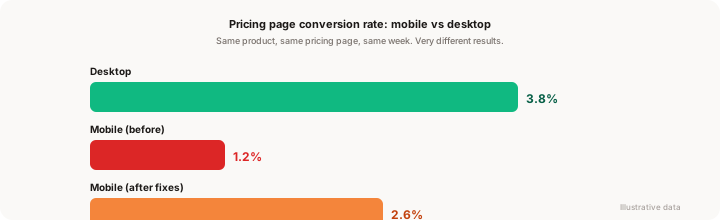
- Desktop pricing page conversion: 3.8%
- Mobile pricing page conversion: 1.2%
Mobile was converting at less than a third the rate of desktop. And roughly 52% of the site's traffic was coming from mobile devices.
That is not a traffic problem. That is not a product problem. That is a page problem, and it was sitting right in the middle of the most important step in the funnel.
The founder had never checked this split. There was nothing in the standard dashboard summary to prompt it. The blended average of 2.4% had made the signal invisible.
Why mobile conversion was so low
Opening the pricing page on a phone made the problem obvious within about thirty seconds.
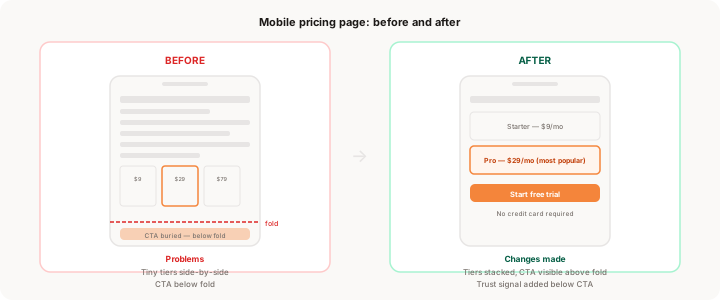
The three pricing tiers were displayed side by side. On desktop, this looked clean. On a small screen, each card was squeezed to about 100 pixels wide. The plan names were readable if you squinted. The features list was not. The monthly price was cut off on two of the three plans.
The primary CTA was below the fold. On desktop, the "Start free trial" button appeared without any scrolling. On a phone, you had to scroll past all three pricing cards, a brief FAQ section, and a short testimonial block before reaching it. Most visitors never got there.
There was no trust signal near the point of decision. The desktop layout had a small line below the CTA: "No credit card required. Cancel anytime." On mobile, that line was buried with the button, below the fold, invisible to anyone who bounced before scrolling.
None of these were intentional design decisions. They were artifacts of a layout that had been built for desktop and never tested on a phone.
What the data suggested
Before touching anything, the founder checked a few more numbers to confirm the diagnosis.
The mobile bounce rate on the pricing page was 74%. Desktop bounce was 41%. That gap alone was telling. Mobile visitors were arriving, taking one look at the page, and leaving. It was not a traffic quality problem. Visitors from the same sources were converting reasonably well on desktop. The page was failing them on mobile.
Session data showed the median mobile visitor scrolled to about 40% of the pricing page before leaving. The CTA was sitting at around 85% down the page. The math was not complicated.
A quick check of the signup form confirmed that mobile users who did manage to reach and click the CTA were completing the form at a similar rate to desktop users: around 68%. The form was not the problem. The path to the form was.
This is a pattern that shows up more often than founders expect. The pricing page works for desktop visitors because the layout was tested on desktop. Mobile gets the same layout, unoptimized, and the conversion gap is the result.
What changed
The founder spent about four hours on a Saturday making three specific changes.
1. Stacked the pricing tiers vertically on mobile.
Instead of three cards side by side, the layout was updated to stack them in a single column on screens smaller than 768px. Each card now had enough space for the plan name, the monthly price in a readable size, a short four-line feature list, and its own CTA button.
This was a CSS change. The underlying pricing structure was identical. No content was added or removed.
2. Moved the primary CTA to above the fold.
The "Start free trial" button for the recommended plan was pulled up to the top of the pricing section on mobile, appearing right after the headline and plan name. A user landing on the mobile pricing page could now see the price and the CTA without scrolling at all.
3. Added the trust signal immediately below the CTA.
The "No credit card required. Cancel anytime." line was placed directly under the primary CTA button on mobile, visible before any scrolling. On desktop this already existed in that position. It just had not been included in the mobile-specific layout.
That was it. No new copy. No pricing change. No redesign. Four hours of responsive CSS and one short line of copy moved to a better position.
The result
The founder checked conversion rates two weeks after the changes went live.
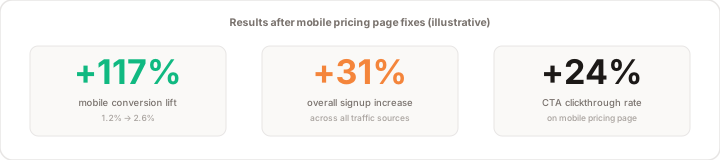
Mobile pricing page conversion went from 1.2% to 2.6%. That is not back to desktop levels, but it is more than double where it started. Given that mobile represented just over half of all traffic, the improvement in the blended signup rate was significant: overall signups increased by 31% in the two weeks after the changes, compared to the two weeks before.
CTA clickthrough on mobile specifically improved by 24%. More people were reaching and clicking the button. Of those who clicked, the completion rate on the signup form was unchanged. The form had always been fine. The bottleneck had always been getting people to the form in the first place.
The changes took four hours to build. The measurement took two weeks to confirm. The impact compounded from there because the page continued to perform at the improved rate for every mobile visitor who arrived after the fix.
What other founders can learn from this
This scenario is common enough that it is worth treating as a checklist item rather than a surprise.
Split your conversion metrics by device type. A blended conversion rate hides a device-specific problem for as long as the problem exists. If 40% or more of your traffic is mobile (and for most SaaS products it is), you need to see mobile and desktop conversion separately. A blended rate of 2.4% might be a perfectly healthy 3.8% on desktop masking a 1.2% on mobile. You will not know until you split it.
Run through your signup flow on a phone. Not a phone simulator. An actual phone. Open your pricing page, time yourself reaching the CTA, and notice every moment you hesitate or scroll past something important. This exercise takes ten minutes and reveals what the data quantifies. Combining both gives you both the "where" (the data) and the "what" (the experience).
Check the specific step where mobile drops. Not all mobile conversion problems live on the pricing page. Some are on the signup form. Some are on the landing page. Some are in the onboarding flow. The diagnostic question is: where in the funnel does mobile conversion first diverge meaningfully from desktop? That step is where you focus. For more on finding the specific point where users stop, where users drop off on your website walks through the full drop-off analysis approach.
Prioritize the step closest to the conversion event. The pricing page is close to the conversion event. A problem there has a high and direct impact on signup rate. A problem on the blog is upstream and less direct. When you find a mobile layout issue, look for the version of it that is closest to where money is made. How to decide what to fix first covers the prioritization logic in full.
Trust signals travel with the CTA. Wherever you put your primary CTA, the "no credit card" or "cancel anytime" line should be directly below or beside it on every screen size. Losing it in a responsive layout is one of the most common and invisible trust signal failures. It does not require A/B testing to confirm its value. Just make sure it is visible.
The mobile conversion and pricing page optimization guides on this blog both go deeper on the individual mechanics. The core lesson here is simpler: if you have not looked at your mobile conversion rate separately from desktop, look at it today. Most founders are surprised by what they find.
FAQ
How common is a large mobile vs desktop conversion gap? Very common among products where the mobile layout was not explicitly tested during design. For SaaS products specifically, a 2x to 4x gap between desktop and mobile pricing page conversion is frequently discovered when founders split the metric for the first time. The gap is not always a layout problem. Sometimes it is a traffic quality difference (mobile traffic often comes from social and is lower-intent). But when the same traffic sources show different conversion rates by device, the layout is usually the cause.
Do I need a mobile-first design to fix this? Not necessarily. The fix in this scenario was not a complete redesign. It was responsive adjustments to an existing layout: stacking rather than side-by-side, repositioning a button, and adding a visible trust signal. For many products, targeted CSS changes to a few key pages produce most of the gain without a full rebuild.
What counts as a good mobile pricing page conversion rate? Benchmarks vary significantly by product type, price point, and traffic source. For a bootstrapped SaaS with a free trial, 2% to 4% on mobile is a reasonable range once the layout is intentional. The more useful target is your own desktop rate. If mobile is within 50% to 70% of desktop, your layout is probably adequate. If mobile is less than a third of desktop, there is almost certainly a layout or friction problem worth investigating.
How long does it take to see results after fixing a mobile layout? Most changes produce measurable results within 7 to 14 days if you have sufficient mobile traffic (roughly 200 or more mobile visitors per week). Changes made on a lower-traffic site take longer to confirm because the sample size takes longer to accumulate. The changes themselves can often be shipped in a few hours.
What tool do you need to find this kind of gap? You need a tool that lets you segment conversion metrics by device type. Many standard analytics tools support this, though the data is not always surfaced prominently. If your current tool shows you blended conversion rates without a clear way to split by device, that is a gap worth addressing. Muro shows device-level conversion breakdowns as part of its standard weekly summary, flagging gaps like this one automatically.
See this kind of insight in your own product
The gap in this scenario existed for months before anyone looked at the right split. The data was there. The problem was that nothing was prompting the founder to look at device-level conversion separately from the blended rate.
Muro is built to surface exactly this kind of comparison: the signal that is hiding inside your existing data, invisible in a standard dashboard, but clear once someone asks the right question.
If you are not sure what your mobile pricing page conversion looks like right now, that is the place to start.