Why mobile users convert less (and how to fix it)
Mobile conversion problems are almost never about intent. They are about load time, layout, form friction, and CTA placement. Find the specific gap in your funnel, fix the highest-friction step first, and measure in one week.
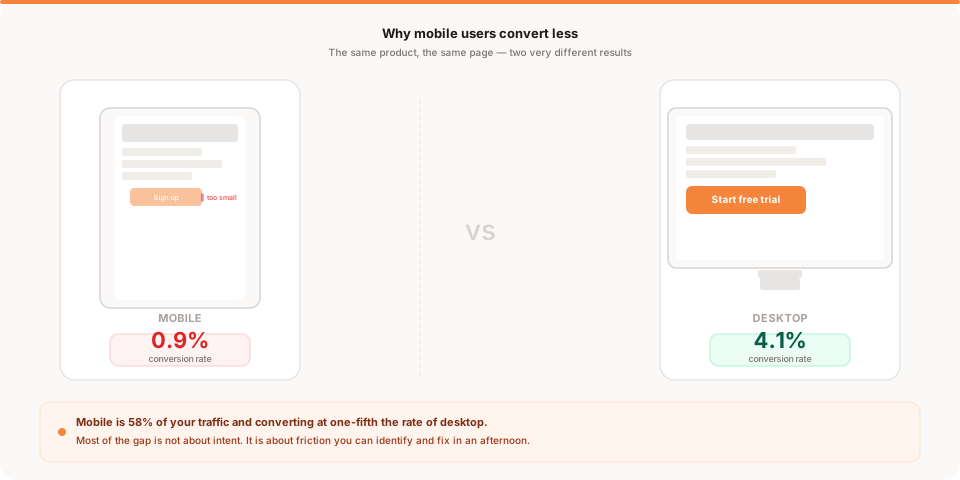
You open your analytics on a Monday morning and notice something you have never looked at before. You filter by device type.
Desktop: 4.1% conversion rate. Mobile: 0.9%.
You have been getting 1,800 visitors per week. About 1,050 of them are on mobile. If mobile converted at the same rate as desktop, you would have 43 additional signups per week. Instead, those 1,050 visitors are producing about 9.
That is 34 signups every week you are not getting — not because the visitors did not want your product, but because something in the experience stopped them.
This is the most common version of a mobile conversion problem. Not obvious. Not dramatic. Just a gap in the numbers that most founders never check until someone points it out.
Why mobile traffic is so high and conversion is so low
Mobile has become the default browsing mode for most people outside of their work hours. A social media link, a newsletter you open on your phone, a Google search while waiting for coffee — all of this lands on mobile.
For most products, mobile traffic is 40% to 65% of total visitors. For products with significant social or content traffic, it can be higher.
The conversion gap has two components. One you cannot fully fix. One you can.
The unfixable part is intent. Mobile browsing often happens in context-switching mode — a commute, a quick break, a scan during a meeting. Someone sees your link, taps through out of curiosity, and is not in the mental space to commit to a signup. Desktop visits tend to be more deliberate. Someone at a laptop is more likely to be in active evaluation mode.
The fixable part is friction. Most early-stage products have mobile-specific friction points that the founders put there without realizing it. Layout that was designed on a desktop. A form that was tested on a keyboard. A CTA that is the right size with a mouse but tiny on a thumb.
You cannot fully eliminate the intent gap. But friction is yours to fix. And friction is the larger part of most mobile conversion gaps.
How mobile users behave differently
Understanding the behavioral differences helps you make better decisions about what to change.
Thumb vs cursor. Mobile navigation happens with a thumb, typically from the bottom of the screen upward. Tap targets that work perfectly with a cursor become frustrating when accuracy matters and the screen is small. A button that looks clickable on desktop can be genuinely difficult to hit on a phone.
Slower connections. Even with modern cellular speeds, mobile loading is often slower than a home or office wifi connection. The difference between a 2-second load and a 4-second load is invisible on desktop wifi but very real on a 4G connection. Each additional second costs you visitors before they see your headline.
Less patience. Mobile visitors make faster judgments. If the page does not communicate its purpose within a few seconds of loading, they leave. Desktop visitors tolerate scrolling and visual complexity more readily. Mobile visitors do not.
Shorter sessions. Mobile browsing tends to happen in shorter windows of attention. A visitor who is genuinely interested may visit on mobile and intend to come back on desktop. Whether they actually do depends on how memorable your product was in that first encounter — and how easy you make it to pick up where they left off.
The six most common mobile conversion problems
These are the specific issues that show up most often in early-stage products. Most founders have at least two or three of them active at any time.
1. The layout breaks on small screens
A layout that looks clean at 1440px wide becomes a mess at 375px. Text compresses. Images overflow. Two-column sections stack in awkward order, often putting the CTA below a long block of text that mobile visitors never scroll to.
The clearest symptom: you have a CTA button above the fold on desktop but below the fold on mobile. Visitors who would have clicked on desktop never see it on mobile.
Test: open your homepage on a phone (not a browser dev tools emulator — a real phone) and look for your primary CTA without scrolling. If you cannot see it immediately, that is your first fix.
2. Page load is too slow
Mobile page speed is often the highest-leverage fix and the most overlooked one. Every additional second of load time after the first two seconds loses visitors. For a page that loads in 2 seconds on desktop wifi, the mobile version on a cellular connection can take twice that or more.
Check your mobile score in Google's PageSpeed Insights. A score below 50 is a significant conversion problem. Common causes: large unoptimized images, third-party scripts (chat widgets, cookie banners, multiple analytics tags), render-blocking JavaScript, and too many custom fonts.
Load time affects every mobile visitor before they see a single word of your content. It is worth fixing before anything else.
3. The signup form is hard to complete on a phone
Forms that are fast and easy on a desktop keyboard become painful on a touch screen. Small input fields. Password fields where autocomplete does not work. Fields without the right input type (so the wrong keyboard opens). Email fields without keyboard hints. CAPTCHA challenges that require selecting images on a small screen.
The fix is not a redesign. It is specific technical details: type="email" on email fields, autocomplete attributes on form fields, autocapitalize="off" on username fields, and generous field height (at least 44px). Then test the form on a real phone and time how long it takes.
For a complete guide to reducing signup friction across both desktop and mobile, why users don't complete signup covers the six most common causes.
4. CTA buttons are too small or hard to find
The standard recommendation for touch targets is 44 by 44 pixels minimum. Many early products have CTAs that meet this on desktop but shrink below it on mobile, or that are placed in locations that are uncomfortable to reach with a thumb.
The bottom center of the screen is the most reachable zone for thumbs on most phones. The extreme top corners and center of wide layouts are the hardest to tap accurately. Where you place your primary CTA on mobile matters as much as what the CTA says.
5. The pricing page collapses badly
Pricing tables designed for desktop often become unusable on mobile. A three-column comparison table becomes three sequential scrolling sections, losing the visual relationship between tiers. The visitor scrolls through all the features of the first plan, then all the features of the second, and by the time they see the CTA they have forgotten what distinguished the plans.
If pricing is a stop on your conversion path, test it specifically on mobile. A visitor who reaches your pricing page is interested. Losing them here is a preventable conversion loss.
6. Trust signals fall below the fold
Social proof, security badges, and money-back guarantees that sit prominently on the desktop version often fall below the first screenful on mobile because less content fits per scroll. A visitor who needs that reassurance before signing up may leave without ever seeing it.
If your trust elements are important to conversion, make sure at least one of them is visible on a mobile screen without scrolling.
How to measure your mobile conversion gap
Before fixing anything, confirm the size of the problem.
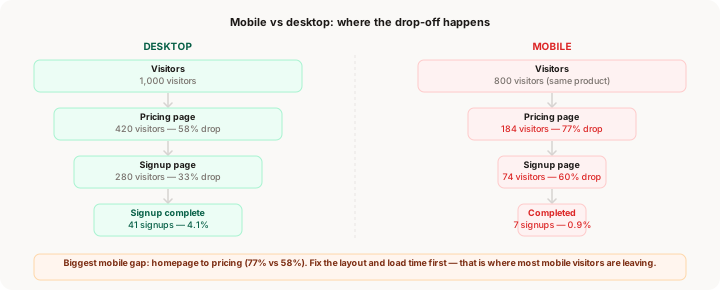
Find your analytics tool and isolate two numbers:
Desktop conversion rate — signups from desktop visitors divided by total desktop visitors.
Mobile conversion rate — signups from mobile visitors divided by total mobile visitors.
A healthy ratio is mobile converting at 50% or more of desktop. If mobile is converting at 30% of desktop or less, you have a friction problem worth fixing.
This comparison is also step four of the diagnostic in traffic is high but signups are low, which is a useful starting point if you are looking at a broader conversion gap and are not sure where to begin.
Next, find which page has the biggest relative drop between mobile and desktop. If your homepage-to-pricing conversion is 42% on desktop but 23% on mobile, the homepage is the problem. If signup completion is 55% on desktop but 18% on mobile, the form is the problem.
Knowing which page has the gap tells you where to focus your first fix.
What to fix first
You have confirmed the gap. Now prioritize by impact per hour of work.
Load time first. If your mobile PageSpeed score is below 60, this is your highest-leverage fix. Improving load time helps every mobile visitor before they interact with anything. The most common quick wins: compress and resize images (a 2MB image does not need to be 2MB), remove third-party scripts that are not essential (especially chat widgets and multiple analytics tags), and reduce the number of custom fonts.
Layout second. If the layout breaks on mobile or your CTA is below the fold, fix the visual hierarchy before optimizing text or copy. A visitor who cannot see the CTA cannot click it.
Form third. If the layout is functional but signup completion is low on mobile, add the correct input type attributes, ensure tap targets are large enough, and test the form on an actual phone. This is often a 1-2 hour fix with a measurable result within a week.
Trust and pricing last. Revisiting trust element placement and pricing page layout is worth doing, but it has a narrower impact than the first three. Fix the high-friction steps before optimizing these.
For the specific page where mobile drop-off is highest, the broader funnel analysis in where users drop off on your website gives you the framework to prioritize precisely.
The one-hour mobile audit
If you have not done a serious mobile review of your product, here is a structured 60-minute version.
10 minutes: Pull the numbers. Find your mobile vs desktop conversion split in your analytics. Identify which page has the largest relative mobile gap. Write down the numbers before you do anything else.
15 minutes: Walk the full flow on your phone. Open your homepage on a real phone. Tap to pricing. Try to sign up. Pretend you have never seen this product before. Write down every moment of friction — anything that is hard to read, hard to find, or hard to interact with.
10 minutes: Run PageSpeed Insights. Test your homepage and your signup page. Look at the mobile score specifically. Read the top three recommendations and note which ones are feasible to fix this week.
10 minutes: Check your CTAs. Is the primary CTA visible on mobile without scrolling? Can you tap it accurately? Is there enough space around it to avoid accidental taps on adjacent elements?
15 minutes: Go through the signup form. Fill it out on your phone. Count the fields. Note whether the right keyboard opens for each field. Check whether autocomplete works. Note whether the layout stays usable when the keyboard is open.
This audit does not fix anything. It tells you exactly what to fix, in what order, and gives you a clear starting point for the next week.
The single most important habit
Most founders check their overall conversion rate. Very few check the mobile and desktop split as a regular habit.
If you track one additional number as part of your weekly analytics review, make it the mobile conversion rate. Compare it to desktop every week. A gap that is staying steady means friction you have not fixed yet. A gap that is widening means a new problem was introduced. A gap that is closing means your fixes are working.
This one habit — regular analytics review with the right questions — catches mobile problems before they compound into weeks of missed signups.
Keep reading
- Why your conversion rate is low: the five real causes of low conversion, with mobile as one of the five
- Traffic is high but signups are low: full diagnostic guide with mobile vs desktop comparison as a dedicated step
- Where users drop off on your website: how to find the specific step where mobile visitors are leaving your funnel
- Why users don't complete signup: the six signup flow problems including mobile-specific friction
- Muro for founders: analytics that surfaces mobile vs desktop conversion splits automatically