Traffic is high but signups are low: what's going wrong?
High traffic with low signups is almost never a landing page problem until you confirm the traffic is landing on your landing page. Most of it isn't. Start by checking which pages traffic actually hits, then diagnose from there.
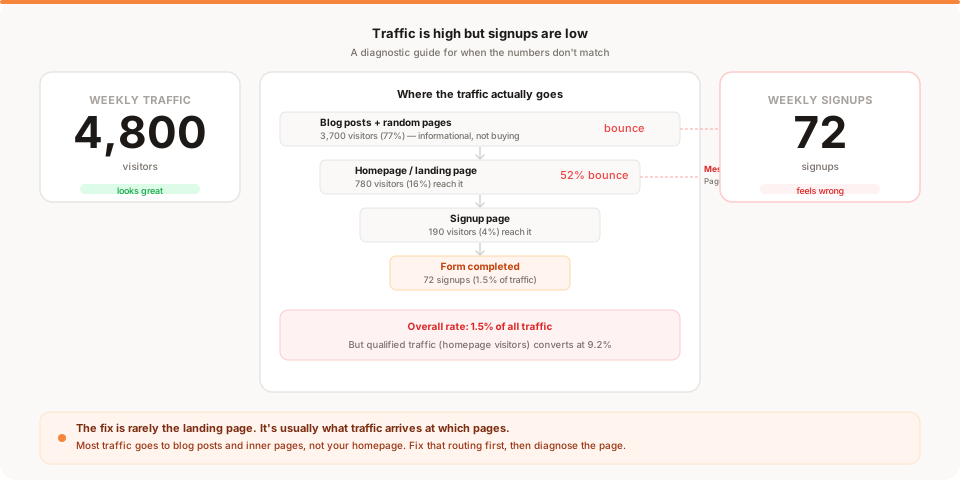
You have traffic. Maybe a lot of it. The numbers in your analytics look respectable, sometimes impressive. And yet the signups are thin — a handful a week, maybe fewer.
Something does not add up.
So you do what most founders do: you start fixing the landing page. Rewrite the headline. Change the CTA button. Add testimonials. Rearrange the sections. You spend a week on it, traffic keeps coming, and the signup count barely moves.
The problem is that you are fixing the wrong thing. Before you can fix the page, you need to know whether the traffic is actually reaching the page.
The gap most founders never check
Here is the thing about website traffic: it does not automatically mean landing page traffic.
When 3,000 people visit your site in a week, where are they actually going? Unless you have done this analysis, you probably do not know. And the answer is usually surprising.
A typical breakdown for an early-stage product with some content:
- 65% to 75% lands on blog posts, documentation, and inner pages
- 15% to 20% lands on the homepage or primary landing page
- 5% to 10% lands on the pricing page
- The rest hits everything else
If only 20% of your traffic ever sees the page you designed to convert visitors, then your conversion rate is being calculated against the wrong denominator. You are dividing signups by all visitors when the relevant audience is only the fraction who reached the page built to sign them up.
Before you rewrite your headline, find out how many people are actually reading it.
The intent problem underneath the numbers
Even among visitors who do reach your homepage, not everyone arrived with buying intent.
Search traffic is the clearest example of this. If someone finds your blog post by searching "what is activation rate," they are looking for information. They want to learn something. Whether they sign up depends on whether they found the post helpful and whether there is a clear path from the post to the product.
If someone finds your homepage by searching "simple analytics tool for startups," they are looking for a product. The intent is commercial. These visitors are ready to evaluate and potentially sign up.
Both might show up in your analytics as "organic search traffic." But they are completely different audiences with completely different conversion expectations. Knowing which traffic source converts best is not just about the channel — it is about the intent of the specific queries driving that channel.
High traffic with low signups often means you have built a content audience that is separate from your buying audience. That is not a disaster. It is a diagnosis.
The diagnostic process
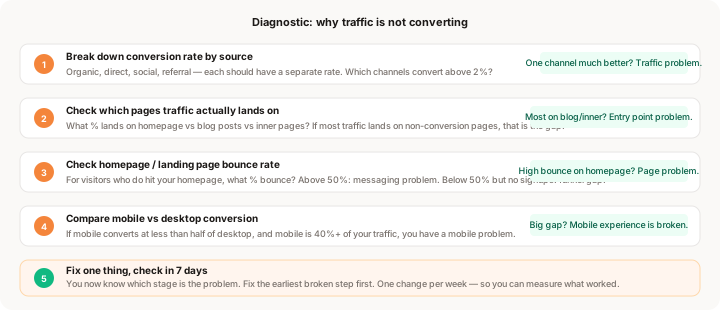
Work through these steps in order. Each one either identifies the problem or tells you to move to the next step.
Step 1: Break down conversion rate by source
Open your analytics. Find conversion rate — signups divided by visitors — split by where those visitors came from.
You are looking for a large gap between sources. Something like:
- Organic search: 3.8% conversion
- Direct: 4.5% conversion
- Social: 0.4% conversion
- Referral: 0.9% conversion
If the gap looks like this, your landing page is working fine for people who arrive with intent. The problem is that a large volume of low-intent traffic is pulling your average conversion rate down.
The fix in this case is not to touch the page. The fix is to either create content and entry points that better capture social/referral visitors, or to accept that those channels produce awareness rather than immediate conversions and stop optimizing the page for that audience.
If organic and direct traffic are also converting poorly — below 2% — then the page has a genuine problem and you should keep reading.
Step 2: Check which pages your traffic actually lands on
This is the check that changes most founders' understanding of their situation.
Look at your top landing pages by visit volume. List the top 10. For each one, note whether it is a conversion-oriented page (homepage, pricing, product landing page) or an informational page (blog post, documentation, help article).
Calculate what percentage of total visits land on conversion-oriented pages. For most content-producing startups, this number is between 15% and 30%.
Now look at the conversion rate for visitors who start on your homepage versus visitors who start on a blog post. The homepage rate will almost always be higher.
If the majority of your traffic is entering through content pages that have no clear path to signup, you have an entry-point problem. Every blog post needs a visible, relevant CTA that gives an interested reader a reason to try the product. Not a generic "sign up for free" in the footer. Something specific to the content they just read.
This change alone — adding proper CTAs to high-traffic content pages — often produces a visible lift in signups without changing a word of the landing page.
Step 3: Check your landing page for the visitors who do reach it
Now that you know what fraction of traffic reaches your homepage or primary landing page, evaluate whether that page is doing its job for the people who arrive.
Check two things: the bounce rate and the conversion rate for this specific page.
If the bounce rate is above 55% on the homepage, visitors are looking at the page and leaving without clicking anything. The most common causes:
The headline does not explain what the product does in five seconds. Visitors should be able to read your headline and understand what you offer without scrolling. If the headline is abstract, aspirational, or describes a category rather than a specific outcome, they leave before they understand.
The page loads slowly. Every additional second of load time loses visitors. This is especially true on mobile. Use a tool like PageSpeed Insights to check. A load time above three seconds on mobile is a meaningful conversion killer.
There is no obvious next step. If the CTA is buried, light in contrast, or unclear about what happens after clicking, visitors who are interested cannot figure out where to go.
If the bounce rate is below 55% but conversion is still low, visitors are engaging with the page but not signing up. In this case the messaging may be clear but the barrier to signup is too high. Review each step of the signup funnel itself to find where interested visitors are stopping.
Step 4: Compare mobile and desktop conversion rates
This step catches a problem that many founders discover late, because most development and testing happens on desktop.
Find your conversion rate for mobile visitors versus desktop visitors. A healthy ratio is mobile converting at 60% or more of the desktop rate. A common reality for early products is mobile converting at 20% to 30% of desktop.
If you have 40% of your traffic on mobile and mobile converts at one-quarter the rate of desktop, you are losing a substantial number of signups to a preventable problem.
Open your product's signup flow on your phone right now. Go through every step. Note:
- How long it takes to reach the signup form
- Whether the form fields are easy to fill on a touch keyboard
- Whether any elements overflow or are difficult to tap
- Whether the CTA buttons are large enough to hit accurately
If anything creates friction, that friction is costing you signups every day. For a complete breakdown of the six most common mobile friction points and how to fix each one, why mobile users convert less covers the full list with a prioritization guide.
Step 5: Audit the signup funnel itself
If traffic quality is fine, entry points are fine, the landing page is fine, and mobile is fine, the problem is in the conversion mechanics between "interested" and "signed up."
Look at the gap between visitors who click the signup CTA and visitors who complete the signup:
- How many visitors reach the signup page?
- How many submit the form?
- If email verification is required, how many complete it?
If 300 people reach the signup page but only 30 complete it, the form is the bottleneck. The most common causes are: too many fields, required credit card before the user sees the product, or email verification that sends people away from the product before they are hooked.
For a specific guide to diagnosing signup funnel drop-off, why users don't complete signup covers each cause with the fix.
Three real scenarios
Understanding the diagnostic in the abstract is different from seeing it applied. Here are three situations that look identical from the outside but have completely different causes.
Scenario 1: The content site problem
A founder has built a small analytics blog that gets 4,000 visitors per week. Signups are 20 per week. That is a 0.5% rate.
The diagnostic: 3,200 of those visitors land on blog posts. About 800 reach the homepage. The homepage converts at 3.2% (26 signups per week). But because the blog posts have no CTA, the 3,200 informational visitors convert at near zero.
The fix: Add a relevant CTA to every blog post. Something like "Want to see your own data analyzed this way? Try Muro free." Within a month, content traffic starts contributing signups.
Scenario 2: The mobile blindspot
A founder has 1,500 weekly visitors, mostly from social, with 18 weekly signups. Overall rate: 1.2%.
The diagnostic: Source breakdown shows organic converts at 4%, social at 0.8%. But organic is only 15% of traffic. Digging further: desktop converts at 3.8%, mobile converts at 0.3%. Mobile is 55% of all traffic.
The fix: The signup form has fields that break on mobile and the credit card field is positioned awkwardly. Fixing the mobile layout triples mobile conversions within two weeks.
Scenario 3: The messaging gap
A founder has 2,000 weekly visitors, 90% landing on the homepage. Signup rate: 1.4%. Bounce rate on homepage: 68%.
The diagnostic: Source quality is fine — organic converts at 1.6%, direct at 1.8%. Traffic is landing on the homepage. But 68% bounce means most visitors read the headline and leave.
The fix: User interviews reveal that the headline ("Better insights for growing teams") does not explain what the product does. Changing it to "Analytics that tells you what to do next — without the dashboard" drops the bounce rate to 44% and lifts conversion to 2.9%.
What to fix first
You ran the diagnostic. You found one (or more) problems. Here is the order of priority:
Entry points first. If most of your traffic is hitting non-conversion pages with no CTA, fix that before anything else. This is the highest leverage change because it expands the pool of visitors who even see your product.
Mobile second. If mobile converts at less than half of desktop and mobile is more than 30% of your traffic, this is your highest-impact technical fix. It is also fast to diagnose and often fast to fix.
Messaging third. If qualified traffic is reaching the page and bouncing heavily, the headline and value proposition need work. Make one targeted change — the hero section specifically — and test it for a full week.
Funnel last. If visitors reach the signup page but don't complete it, reduce form fields and remove unnecessary barriers. This is impactful but only relevant if the earlier stages are working.
Do not try to fix all four simultaneously. Changing multiple things at once means you will not know what worked. One change per week, checked against the relevant metric.
What not to do
Do not start by redesigning the entire landing page. A full redesign is expensive, time-consuming, and hard to learn from. If the diagnostic points to a specific section — the headline, the CTA placement, the pricing table — change that section. Not the whole page.
Do not assume more traffic will fix a conversion problem. More traffic multiplied by a 0.5% conversion rate is more visitors who do not sign up. Traffic and conversion are separate levers. Understanding which one to pull saves weeks of misdirected effort.
Do not add social proof, testimonials, or case studies as the first response to low conversion. Social proof helps convert visitors who are already interested but uncertain. It does not help visitors who left in the first five seconds because the headline was unclear, or who never reached the page because the blog post had no CTA.
Diagnose. Then fix the one thing that the diagnosis points to.
Keep reading
- Why your conversion rate is low: a deeper guide to the five specific causes and how to fix each one
- Traffic is up but conversions are down: how to handle the specific scenario where a sudden traffic increase drops your rate
- Where users drop off on your website: the full funnel analysis framework
- Muro for founders: analytics that surfaces conversion problems automatically without requiring you to build reports